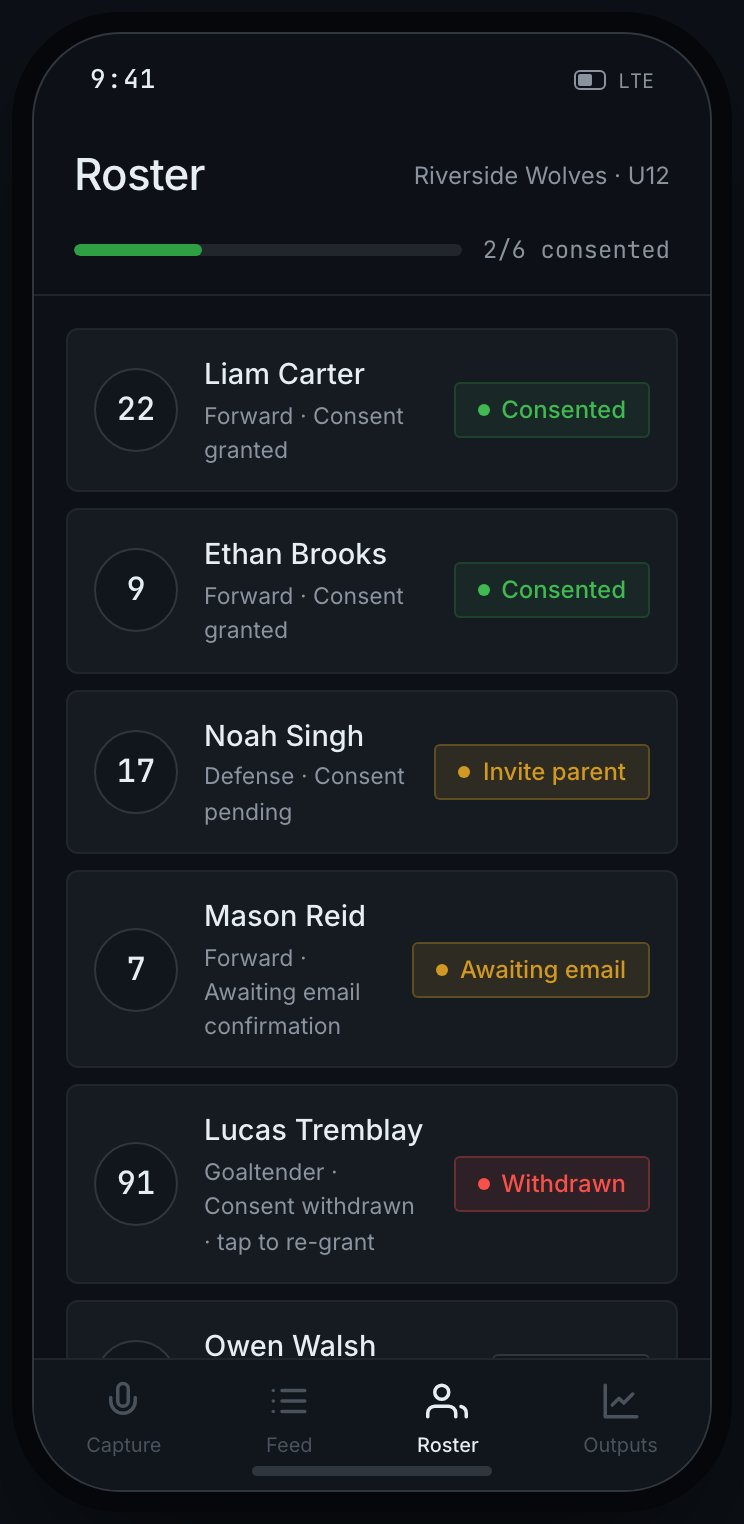
Consent in RinkNotes is per player. Who grants it depends on the team: on a youth team
the player’s parent consents (the default), and on an adult team the player consents for
themselves. Either way, your job as an admin or head coach is to keep it current:
Send a consent request for every player before capturing about them.
Watch each player’s consent status on the Roster & Consent screen.
Re-send requests to anyone who hasn’t responded.
Remember that consent can be withdrawn at any time — capture for that player stops immediately.
Every team has a consent model that decides who grants consent:
Youth (the default). A parent consents for each player, and the player never signs in.
This is how a minor-hockey team works out of the box.
Adult. Each player consents for themselves and holds their own account, with no parent
in the loop.
A club admin sets a team’s model — a head coach can’t change it on their own — and new
teams start on the youth model until an admin switches them. Everything else on this page
(blocking, withdrawal, isolation) works the same way in both; only who grants consent changes.
The consent gate is identical either way — a youth team's parent grants it, an adult team's player grants it for themselves.
If a player on the roster is a staff member’s own child, they use “This is my child” rather
than emailing themselves — RinkNotes sends a confirmation link to their registered email as
proof of consent. Until they click it, the player stays Awaiting email confirmation.
Consent is enforced by the system, not by convention. A blocked player’s notes are held as
consent blocked and are never attributed to the player — there’s no way to override it
short of consent being granted.
The full parent side of this is documented in the Parents section.