

Three modes
Game
A timed session with a running clock and periods. Best for game day.
Practice
A session with no clock. Best for practices and skills sessions.
General
No session at all — just a quick note about the team or a player, anytime.
Game mode
Start a game and RinkNotes shows a running clock. You can start from an upcoming game you’ve scheduled (it fills in the opponent) or tap New Game. When you create a new game you can say it or type it. Tap 🎤 Say the game and speak (“home game against Northgate, Friday at 7”) — RinkNotes fills in the opponent, date, time, and home/away for you to review. Or type the fields in directly. Either way you confirm the details before the game is created. During the game you can mark periods — 1st, 2nd, 3rd, OT, SO. RinkNotes may suggest the next period (“Looks like 2nd?”); you confirm it. Every note you capture is tagged with the game time and period, so game stats line up with when things happened.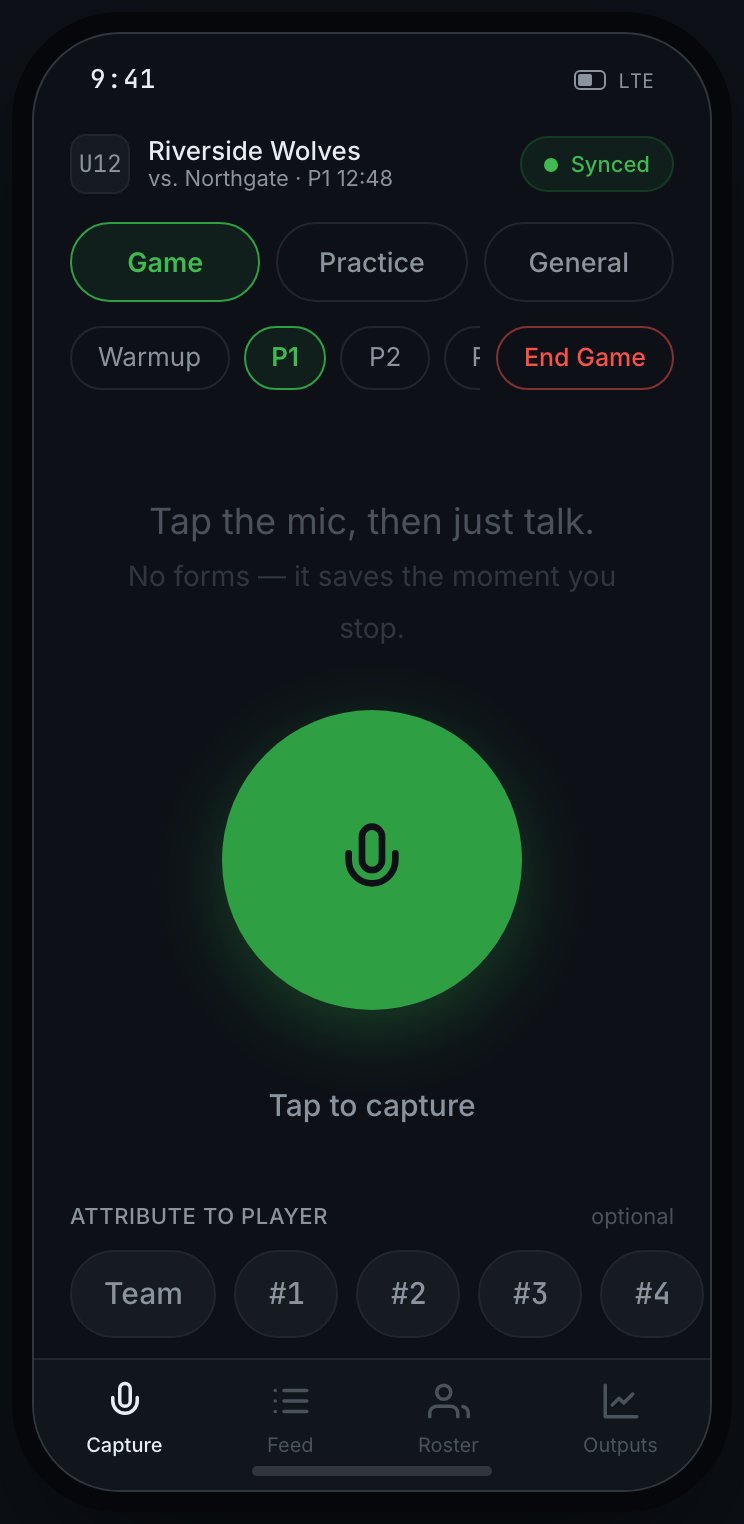
Game-mode capture: the team and game context up top, the mode switch, period markers, the mic, and a tap-to-attribute jersey row.
Practice mode
The same capture experience with no clock and no periods — just start a practice and speak your notes.General mode
No session. Tap the mic and leave a quick note about the team or a player. Good for between-games thoughts.Ways to start a note
There are three triggers. The web app has one; the iOS app adds two hands-free ways so you can keep your eyes on the ice.- Tap the mic
- AirPod tap (iOS)
- Say "RinkNotes" (iOS)
Tap the mic button, talk, and it saves when you stop. This works everywhere
RinkNotes runs — web and iOS — and it’s the one trigger that never lets you down.
If you learn only one, learn this.
Hands-free triggers (AirPod, wake word) are iOS-app features and need microphone
and notification permission. On the web, use the mic button.
Try it
Switch modes, start a note, and watch it write itself — then attribute it to a jersey.Prefer to type?
You don’t have to speak. Tap Type a note instead to write a note by hand — useful when you’re somewhere you can’t talk, or when you want to jot something after the fact. Typed notes go through the same review and become the same outputs as spoken ones.Attribute a note to a player (optional)
After (or before) you speak, tap a jersey number to attribute the note to that player. Only players whose parents have consented show up in that row — that’s deliberate, not a glitch. No consent, no name, so there’s no way to accidentally attach a note to a kid you’re not cleared to track. If you don’t attribute a note, it stays at the team level.A rink dead-zone won’t cost you a note
Half the arenas in the league have no signal past the lobby. Capture anyway. Notes you record offline are held on your device — encrypted, not sitting in the open — and upload themselves the moment you’re back on wi-fi or cell. You’ll see a count of what’s waiting and a Synced status once it clears. Don’t stand by the door hunting for bars; capture and keep coaching.Your note is captured. It appears in your Feed to review and confirm.